Time-lapse photography offers a unique perspective of the world, compressing months of construction or hours of nature into mesmerizing seconds. While professional setups can cost thousands of dollars, you don't need to break the bank to get started.
In 2026, "cheap" doesn't mean "low quality." It means finding the right tool for the job. Whether you are a hobbyist, a homeowner documenting a renovation, or a construction manager on a tight budget, there are affordable options available.
In this guide, we rank the 6 best budget-friendly time-lapse cameras, ranging from under $50 DIY solutions to the best-value professional gear.
Table of Contents
Why "Cheap" Can Be Expensive (Read This First)
Top 6 Budget Time Lapse Cameras
How to Choose the Right Budget Camera
FAQs
1. Why "Cheap" Can Be Expensive (Read This First)
Before buying the cheapest camera you find, consider the Hidden Costs:
Battery Cost: A cheap camera that eats AA batteries every 3 days will cost you hundreds of dollars a year.
Accessories: Does it need a waterproof case ($30)? A mounting bracket ($20)?
Travel Cost: If the camera has no 4G/WiFi remote access, you have to drive to the site to check the footage. Gas money adds up.
Our definition of "Best Cheap Camera" considers the Total Cost of Ownership, not just the sticker price.
2. Top 6 Budget Time Lapse Cameras in 2026
1.Farpov Pro (Best Value & Professional Features)

The "Smart Investment" Choice
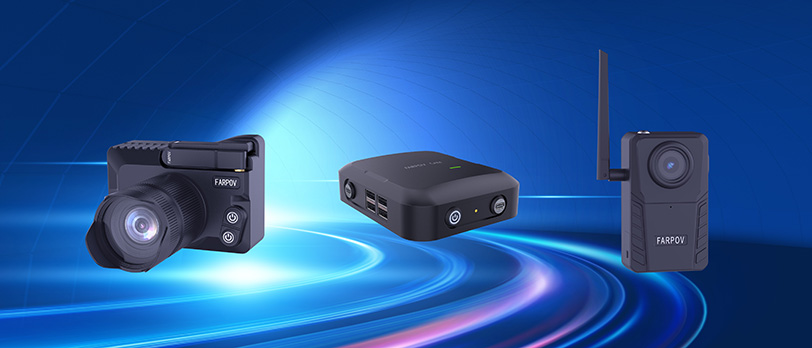
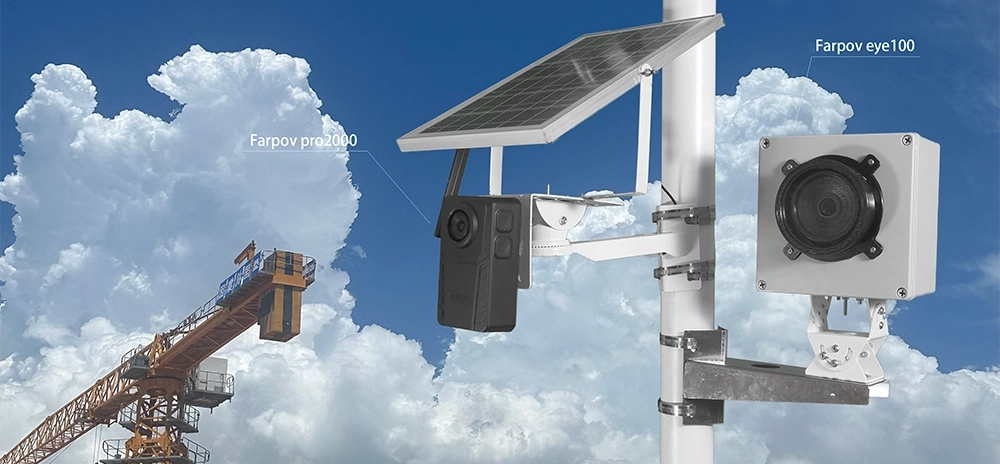
While the Farpov Pro has a higher upfront cost than a webcam, it is the undisputed king of value. It is an all-in-one solution that includes a solar panel, 4G connectivity, and a weatherproof housing. If you were to buy these accessories separately for other cameras, you would spend double.
Why it wins: It brings $2,000+ DSLR-level features (Cloud control, Solar power) to a budget-friendly price point.
Key Features:
Resolution: 4K Ultra HD.
Power: Solar Powered (Included) - Zero battery cost.
Connectivity: 4G LTE & WiFi (Remote control from anywhere).
Durability: IP66 Weatherproof.
Best For: Long-term construction projects, outdoor monitoring, and users who want professional results without the professional price tag.
[Check Price & Details]
2. Wyze Cam v3 (Best Under $50)
The "Ultra-Budget" Choice
If you have Wi-Fi available and a power outlet nearby, the Wyze Cam v3 is unbeatable for the price. It's primarily a security camera, but its app has a surprisingly good built-in time-lapse feature.
Pros: Insanely affordable (~$35), great color night vision, IP65 weather resistance.
Cons: Must be plugged in (no battery), requires Wi-Fi (no 4G), lower resolution compared to dedicated cams.
Best For: 3D printing monitoring, backyard flower blooming, indoor home renovations.
3. Akaso Brave 7 LE (Best GoPro Alternative)
The "Action Cam" Choice
Want the versatility of a GoPro without paying $400? The Akaso Brave 7 LE offers 4K video and a dual-screen design for a fraction of the cost. It’s small, rugged, and great for travel.
Pros: 4K video, waterproof body (no case needed), front screen for vlogging.
Cons: Battery life is short (60-90 mins) – not suitable for long-term projects without external power.
Best For: Travel time-lapses (sunsets, city traffic), vlogging, short-term events.
4. Campark T80 Trail Camera (Best for Wildlife/Nature)
The "Set and Forget" Choice
Originally designed for hunting, trail cameras are excellent budget tools for outdoor time-lapse. They run on AA batteries and are built like tanks.
Pros: Runs for months on AA batteries, completely waterproof, very cheap (~$60).
Cons: No remote view (you must physically take the SD card out to see photos), video quality is usually lower than 4K.
Best For: Remote nature spots, monitoring farm growth, budget construction sites where image quality isn't critical.
5. Your Old Smartphone (Best Free Option)
The "Zero Cost" Choice
You probably have an old iPhone or Android in a drawer. With a $15 tripod and a free app (like Lappse It or Hyperlapse), it becomes a powerful camera.
Pros: Free, excellent screen, familiar interface.
Cons: Not waterproof, battery dies quickly (needs power bank), phone might overheat in the sun.
Best For: Indoor creative projects, cooking videos, drawing/art process videos.
6. Brinno TLC200 Pro (Best Dedicated Hardware)
The "Classic" Choice
Brinno has been a leader in budget time-lapse for years. The TLC200 Pro is an older model (720p), but its battery life is legendary.
Pros: Incredible battery life (months on 4 AA batteries), very easy to use.
Cons: Only 720p resolution (looks grainy on modern screens), no screen to preview shot, outdated tech.
Best For: Simple construction projects where high resolution doesn't matter, but battery life does.
3. How to Set Up Your Budget Time-Lapse Camera
Stability is Key: Even a cheap camera looks professional if it doesn't shake. Invest in a sturdy tripod or clamp.
Power Management:
Interval Settings:
Clouds/Traffic: 1-3 second interval.
Construction: 5-10 minute interval.
Plants Growing: 10-30 minute interval.
4. FAQs
Q: Can I use a cheap camera for a 6-month construction project?A: Yes, but be careful with power. Action cams (like Akaso) and phones will die in hours. For long-term projects, you need a camera with Solar Power (like Farpov Pro) or massive battery life (like Brinno or Trail Cams).
Q: Is 1080p enough for time-lapse?A: For viewing on a phone, yes. But for YouTube or client presentations in 2026, 4K is the standard. We recommend choosing a 4K capable camera like the Farpov Pro or Akaso.
Q: Do I need Wi-Fi?A: If you want to check your camera without driving to the location, yes. Cameras with 4G LTE (like Farpov Pro) are the best because they work where Wi-Fi doesn't reach.
Conclusion
You don't need a Hollywood budget to shoot stunning time-lapses.
For home use, grab a Wyze Cam.
For travel, get an Akaso.
But if you need a professional, set-it-and-forget-it solution for construction or long-term outdoor monitoring, the Farpov Pro offers the best value for money in 2026.
[Explore Farpov Pro Features]










 WeChat
 WhatsAPP